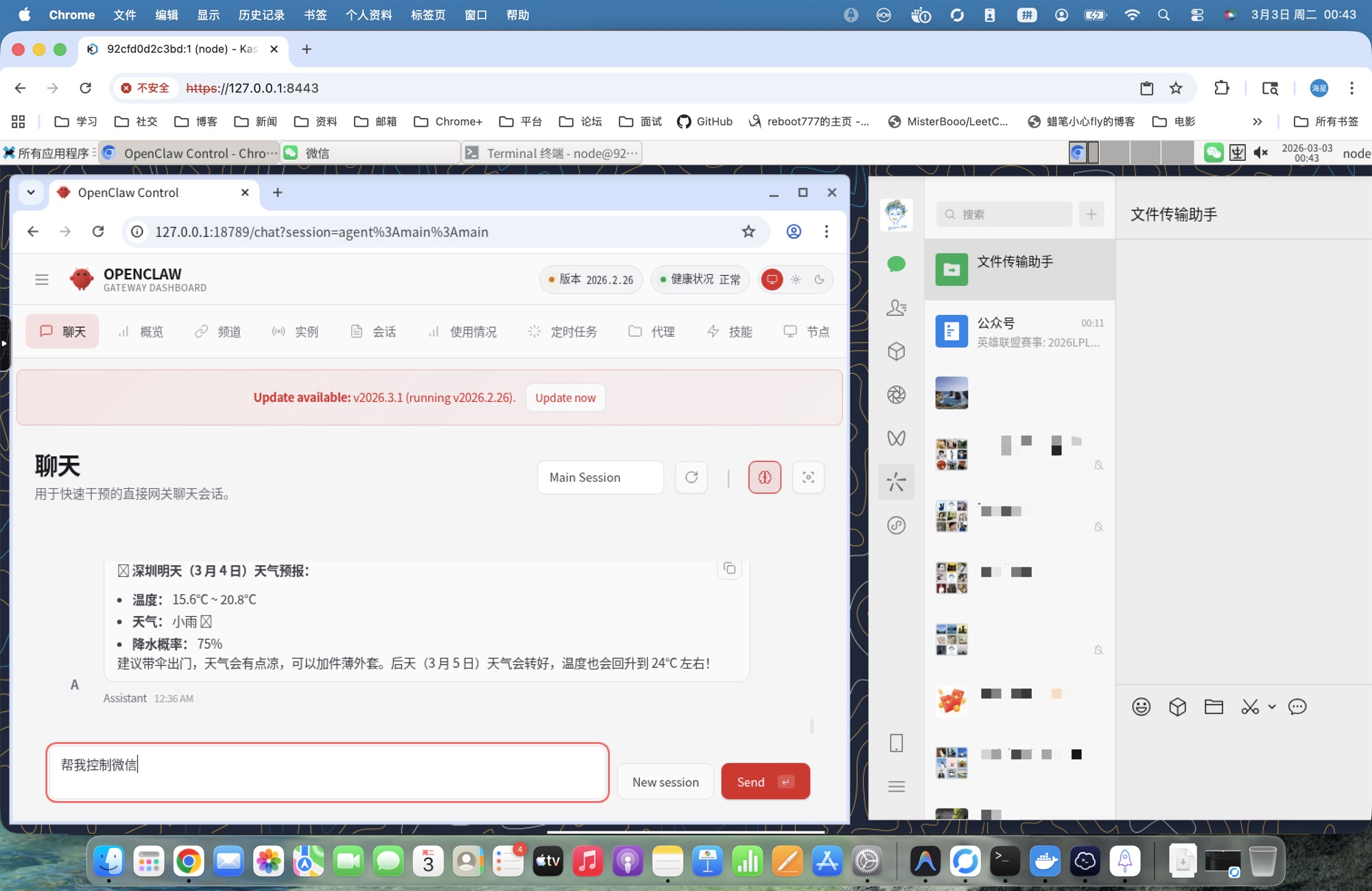
OpenClaw Cloud Desktop, browser-based remote desktop with Docker-in-Docker and GPU acceleration, ready out of the box
Solving core pain points of official Docker solution and cloud vendor deployments
Official Docker solution lacks systemd, preventing in-container restart/upgrade. This project solves it perfectly with systemctl shim, supporting full lifecycle management like restart and upgrade inside containers
Cloud vendor one-click deployments only provide CLI, making it impossible to observe Agent operations. This project provides a complete XFCE desktop to watch OpenClaw interact with browsers in real-time
Provides no-dind variant without privileged mode, removes SSL verification bypass, restricts sudo permissions, includes health checks and vulnerability scanning
No VNC client installation needed, access full Linux desktop environment directly from your browser
OpenClaw, desktop, and dependencies all run inside containers without polluting the host system
Complete installation with a single command, supporting full lifecycle management: install / upgrade / restart / uninstall
Automatically detects NVIDIA GPU during installation, enables nvidia runtime if available, skips otherwise
Standardized container solution enables large-scale lobster deployment, unified management of multiple OpenClaw instances
Unified experience across Windows (PowerShell) / macOS / Linux with consistent behavior
Built-in dockerd inside container, OpenClaw can directly create and manage child containers without extra configuration
Supports amd64 and arm64 architectures with automated builds and tests ensuring cross-platform compatibility
GitHub Actions automatically builds 4 image variants with integrated security scanning and functional testing
Choose installation method: one-click script or Docker image
irm https://claw.ihasy.com/openclaw-kasmvnc.ps1 | iex
curl -fsSL https://claw.ihasy.com/openclaw-kasmvnc.sh | bash -s -- install
curl -fsSL https://claw.ihasy.com/openclaw-kasmvnc.sh | bash -s -- install
Prerequisites: Docker (with Docker Compose v2) · Windows requires PowerShell 5+ · macOS/Linux requires Bash
docker run -d \
  --name openclaw-kasmvnc \
  --privileged \
  --shm-size=2g \
  -p 18789:18789 \
  -p 8443:8444 \
  -e OPENCLAW_GATEWAY_TOKEN=your-token-here \
  -e OPENCLAW_KASMVNC_PASSWORD=your-password-here \
  -v ~/.openclaw:/home/node/.openclaw \
  ddong8/openclaw-kasmvnc:latest
docker run -d \
  --name openclaw-kasmvnc \
  --privileged \
  --shm-size=2g \
  -p 18789:18789 \
  -p 8443:8444 \
  -e OPENCLAW_GATEWAY_TOKEN=your-token-here \
  -e OPENCLAW_KASMVNC_PASSWORD=your-password-here \
  -e USE_CN_MIRROR=0 \
  -v ~/.openclaw:/home/node/.openclaw \
  ddong8/openclaw-kasmvnc:latest-intl
If you don't need OpenClaw to manage sub-containers, use the no-dind variant for better security (no --privileged required):
docker run -d \
  --name openclaw-kasmvnc \
  --security-opt seccomp=unconfined \
  --shm-size=2g \
  -p 18789:18789 \
  -p 8443:8444 \
  -e OPENCLAW_GATEWAY_TOKEN=your-token-here \
  -e OPENCLAW_KASMVNC_PASSWORD=your-password-here \
  -v ~/openclaw-data:/home/node \
  ddong8/openclaw-kasmvnc:latest-intl-no-dind
Note: --security-opt seccomp=unconfined is required on Docker < 23.0 — older default seccomp blocks the close_range syscall, causing XFCE to render a black screen. Docker 23.0+ allows it by default and the flag may be omitted.
For more image variants and configuration, see DOCKER-en.md
Use Alibaba Cloud Bailian API to access Chinese LLMs
Visit Alibaba Cloud Bailian Console to create an API Key for OpenClaw to call LLMs.
After installation, edit ~/.openclaw/openclaw.json (path inside container) and fill in your API Key:
{
  "mcpServers": {},
  "providers": {
    "bailian": {
      "name": "Alibaba Cloud Bailian",
      "baseUrl": "https://coding.dashscope.aliyuncs.com/v1",
      "apiKey": "sk-your-api-key-here",
      "models": [
        { "name": "qwen3.5-plus", "maxTokens": 41960 },
        { "name": "qwen3-max", "maxTokens": 41960 },
        { "name": "qwen3-coder-next", "maxTokens": 41960 },
        { "name": "qwen3-coder-plus", "maxTokens": 41960 },
        { "name": "MiniMax-M2.5", "maxTokens": 41960 },
        { "name": "glm-5", "maxTokens": 41960 },
        { "name": "glm-4.7", "maxTokens": 41960 },
        { "name": "kimi-k2.5", "maxTokens": 41960 }
      ]
    }
  },
  "selectedProvider": "bailian",
  "selectedModel": "qwen3-coder-plus"
}
⚠ Replace sk-your-api-key-here with your actual API Key
Available models through Bailian API:
| Model | Provider | Features |
|---|---|---|
| qwen3.5-plus | Qwen | Latest generation, strong overall capability |
| qwen3-max | Qwen | Flagship model, top reasoning ability |
| qwen3-coder-next | Qwen | Code-specialized, next generation |
| qwen3-coder-plus | Qwen | Code-specialized, cost-effective |
| MiniMax-M2.5 | MiniMax | Multimodal, long context |
| glm-5 | Zhipu AI | Latest GLM generation |
| glm-4.7 | Zhipu AI | Stable and reliable |
| kimi-k2.5 | Moonshot | Long text understanding |
Alibaba Cloud Bailian API Limited-Time Discount — LLM Starter Package up to 55% off
LLM starter package first-purchase discount, supports Qwen, GLM, Kimi and other Chinese LLMs, exclusive for new users
Claim Now4 pre-built image variants for different use cases
| Image Tag | Description | Use Case |
|---|---|---|
| latest | Chinese + China Mirrors + DinD | Chinese users, need Docker-in-Docker |
| latest-intl | International + Official Sources + DinD | International users, need Docker-in-Docker |
| latest-no-dind | Chinese + China Mirrors + No DinD | Chinese users, no sub-containers (more secure) |
| latest-intl-no-dind | International + Official Sources + No DinD | International users, no sub-containers (more secure) |
Full lifecycle management with a single script
--no-cache parameter to disable Docker build cache: ./openclaw-kasmvnc.sh install --no-cache (Windows use -NoCache).--gateway-port 28789 --https-port 9443 (Windows use -GatewayPort 28789 -HttpsPort 9443), then reinstall.restart → status → logs --tail 200 → upgrade.